
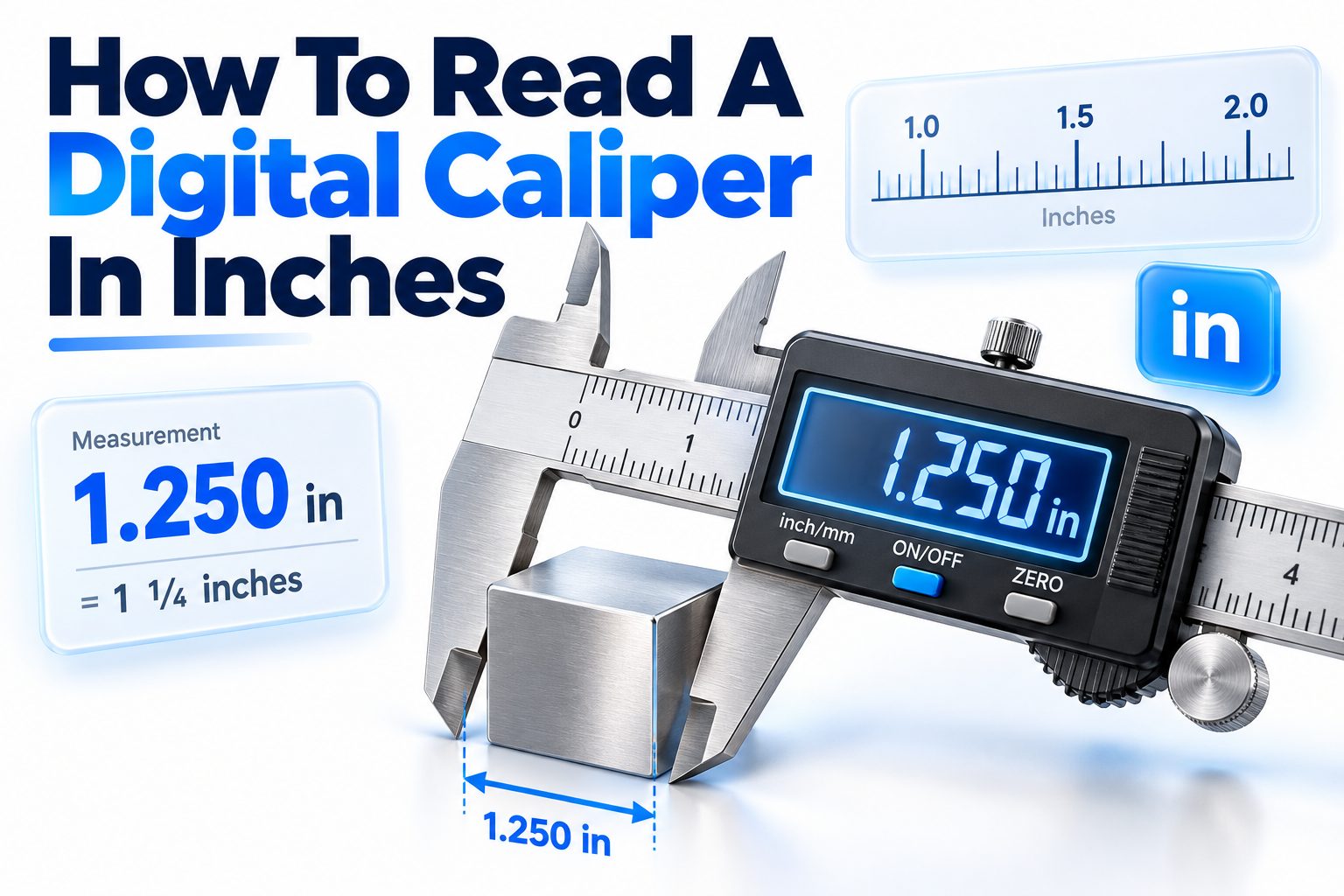
A digital caliper takes much of the guesswork out of measuring, but the screen alone does not guarantee an accurate result. You still need to choose the correct measuring surfaces, position the tool properly, apply consistent pressure, and interpret the displayed inch value. Small handling errors can easily change a reading by several thousandths of an inch.
Learning how to read a digital caliper in inches starts with three basic actions: clean and close the jaws, press the zero button, and select inch mode. Place the part between the appropriate jaws, close them gently until both measuring faces make full contact, and read the number on the display. A reading of 0.375 in, for example, means three hundred seventy-five thousandths of an inch, which is also equal to 3/8 inch.
This article explains that process in detail. You will learn how to measure outside dimensions, inside dimensions, depths, and steps; interpret decimal-inch readings; avoid common errors; and check whether your caliper is producing reliable results.
Digital Caliper Parts and Their Functions
Most digital calipers have four measuring features: large outside jaws, smaller inside jaws, a depth rod, and step-measuring surfaces. Each feature measures a different type of dimension, so choosing the correct one is the first step toward an accurate result.
The body also includes a sliding scale, LCD screen, thumb roller, locking screw, and control buttons. Common buttons include ON/OFF, ZERO, and inch/mm. Some models combine functions or use an ABS button to switch between absolute and relative measurement modes.
Outside Measuring Jaws
The large lower jaws measure outside dimensions, including material thickness, shaft diameter, bolt diameter, and the width of a block. Their flat inner faces should sit squarely against the part without tilting or touching dirt, burrs, or damaged edges.
Inside Measuring Jaws
The smaller upper jaws measure internal dimensions such as hole diameters, slots, and the space between two surfaces. Their outward-facing edges contact the inside walls. Because contact occurs near the tips, alignment is especially important when measuring narrow openings.
Depth Rod
The thin rod extending from the end of the beam measures the depth of holes, recesses, and slots. The end of the caliper beam rests on the reference surface while the rod extends down until it touches the bottom.
Step-Measuring Surfaces
The machined surfaces at the rear of the jaws measure the height difference between two levels. Step measurement is useful for shoulders, ledges, counterbores, and machined features that are awkward to measure with the depth rod.
What an Inch Reading Means
A digital caliper set to inches normally displays decimal inches rather than fractions. The digits represent inches and portions of an inch divided into tenths, hundredths, thousandths, or, on some models, half-thousandths.
For example, 1.250 in means one inch plus 250 thousandths of an inch. Because 0.250 inch equals 1/4 inch, the measurement can also be described as 1 1/4 inches. The digital value is usually preferable for machining, inspection, and technical work because it avoids fraction-conversion errors.
Important Display Facts
- A reading of 0.100 in means one tenth of an inch.
- A reading of 0.010 in means ten thousandths of an inch.
- A reading of 0.001 in means one thousandth of an inch.
- A display showing 0.500 in indicates half an inch.
- A negative symbol means the slider has moved below the current zero point.
- “in” identifies inch mode, while “mm” identifies millimeter mode.
- Extra displayed digits do not automatically guarantee matching accuracy.
Preparing the Caliper Before Measuring
Wipe the measuring faces with a clean, lint-free cloth before every important measurement. Oil, dust, metal chips, and fingerprints can create a gap between the jaws. Even a particle too small to notice can affect a measurement made to the nearest thousandth.
Move the slider through part of its travel to confirm that it operates smoothly. If it sticks, feels gritty, or changes readings unpredictably, clean the beam rather than forcing it. Check the battery symbol and replace a weak battery if the display flickers or resets.
Cleaning and Inspecting the Jaws
Close the outside jaws and hold them toward a light source. A visible gap may indicate debris, a burr, jaw damage, or misalignment. Clean the contact faces gently; do not use abrasive paper unless the manufacturer specifically permits it.
Inspect the part as well. A burr on a drilled hole or cut edge may be measured instead of the intended surface. Remove loose debris and measure away from obvious damage. In precision work, record unusual surface conditions rather than silently compensating for them.
Setting Zero and Inch Mode
Close the jaws using light, consistent pressure, then press ZERO. The display should show 0.000 in or the resolution supported by the instrument. Press the inch/mm button until the inch indicator appears.
Open and close the jaws again to verify that zero returns consistently. If the display settles at 0.001, −0.001, or another value, clean the jaws and repeat the test. Persistent zero error can indicate wear, damage, low battery power, or excessive slider play.
Reading a Digital Caliper in Inches Step by Step
The same basic sequence works for most measurements, although the contact surfaces change according to the feature being checked. Your goal is firm, complete contact without squeezing hard enough to distort the part or flex the caliper.
1. Clean the caliper’s measuring faces and the part.
2. Close the outside jaws gently and press the zero button.
3. Select inch mode and confirm that “in” appears on the screen.
4. Choose the correct feature: outside jaws, inside jaws, depth rod, or step surfaces.
5. Position the caliper square to the dimension being measured.
6. Move the slider until the measuring surfaces make full contact.
7. Apply light, consistent pressure with the thumb roller.
8. Rock or reposition the tool slightly when necessary to locate the true dimension.
9. Lock the slider if the position must be preserved.
10. Read and record the complete decimal value, including trailing zeros when they communicate required precision.
Measuring Outside Dimensions
To measure thickness, width, or outside diameter, open the large jaws slightly wider than the part. Place the part between them and close the jaws until both faces touch. Keep the jaw faces flat against the surfaces rather than contacting only an edge or corner.
For a round shaft, keep the caliper perpendicular to the shaft’s centerline. Gently rock it while maintaining contact; the smallest stable reading usually represents the true diameter. Measure at several locations if you need to check taper, ovality, or uneven wear.
Example of an Outside Measurement
Suppose the jaws close around a steel pin and the screen shows 0.3745 in. The pin’s measured diameter is 0.3745 inch. If the caliper resolves only to 0.001 inch, it may instead display 0.375 in.
Do not automatically report that pin as exactly 3/8 inch merely because 0.375 equals 3/8. The reading describes the measured size, while a nominal 3/8-inch specification may permit a defined tolerance above or below that value.
Measuring Inside Dimensions
Insert the smaller upper jaws into the hole or opening while they are partly closed. Expand them until both measuring edges touch the opposing walls. Keep the caliper aligned with the dimension and avoid positioning the jaws diagonally, which produces an oversized reading.
When measuring a round hole, move the caliper gently through the centerline and look for the largest stable reading. A chord measured away from the center is smaller than the true diameter. Repeat the measurement at different angles to reveal an out-of-round hole.
Example of an Inside Measurement
If the screen shows 1.002 in while measuring a bore, record the internal diameter as 1.002 inches. That value is two thousandths larger than 1.000 inch, assuming the caliper is accurate and properly positioned.
Internal jaws may not reach the true walls of very small holes, deep bores, or features with rounded edges. A bore gauge, pin gauge, or inside micrometer may be a better choice when tight tolerances or difficult geometry are involved.
Outside and Inside Measurement Comparison
Measurement type | Caliper feature | Correct alignment | Reading to seek
Outside width | Large lower jaws | Faces parallel to part | Stable direct reading
Round shaft | Large lower jaws | Perpendicular to centerline | Smallest stable reading
Slot width | Small upper jaws | Square across opposing walls | Stable direct reading
Round hole | Small upper jaws | Through the true center | Largest stable reading
Measuring Depth Correctly
Rest the end of the caliper beam flat on the top reference surface. Extend the depth rod until its tip touches the bottom of the hole or recess. Keep the beam seated firmly and hold the tool perpendicular so the rod does not lean.
Avoid pushing hard. Excess force can flex the rod, shift the base, or make the tip enter a soft surface. In a drilled hole with a conical bottom, decide whether the specification refers to full-diameter depth or total depth to the drill point.
Example of a Depth Reading
A display of 0.752 in means the measured distance from the reference surface to the contact point is 0.752 inch. If the requirement is 0.750 ± 0.005 inch, the result falls within the permitted range of 0.745 to 0.755 inch.
Narrow grooves and uneven bottoms may prevent the rod from reaching the intended surface. Check that the rod is not landing on a chip or raised feature. For repeated depth measurements, a dedicated depth micrometer often provides better stability.
Using the Step Measurement Feature
Open the caliper and place the rear step surfaces against the two levels being compared. Slide the jaws until both surfaces sit flush against their respective references. The display shows the vertical or horizontal distance between those levels, depending on the setup.
Step measurement is useful when the depth rod would be unstable or unable to reach the feature. Clean both reference surfaces and press the caliper squarely into position. A tilted beam creates a longer diagonal contact path and an incorrect result.
Quick Tips for Consistent Readings
- Use the thumb roller for smoother, more repeatable jaw movement.
- Measure the same feature two or three times before accepting the result.
- Keep the caliper square to flat parts and centered on round features.
- Use similar contact pressure each time.
- Let hot parts cool before measuring them.
- Lock the slider before moving the caliper away from a difficult location.
- Recheck zero after several measurements or after dropping the tool.
Converting Decimal Inches to Fractions
Digital calipers commonly show decimal inches, while woodworking, construction, and general hardware dimensions are often expressed as fractions. To convert a decimal to a common fraction, multiply the decimal portion by the desired denominator and round to the nearest whole number.
For instance, multiplying 0.375 by 8 gives 3, so 0.375 inch equals 3/8 inch. Multiplying 0.4375 by 16 gives 7, making 0.4375 inch equal to 7/16 inch. Keep the decimal value when tolerances matter because fraction rounding removes detail.
Common Decimal and Fraction Equivalents
Decimal inch | Common fraction
0.0625 | 1/16
0.1250 | 1/8
0.1875 | 3/16
0.2500 | 1/4
0.3125 | 5/16
0.3750 | 3/8
0.4375 | 7/16
0.5000 | 1/2
0.6250 | 5/8
0.7500 | 3/4
0.8750 | 7/8
Measurements rarely land exactly on a familiar fraction. A reading of 0.378 inch, for example, is close to 3/8 inch but is actually 0.003 inch larger. That difference may be irrelevant for rough carpentry yet unacceptable for a closely fitted mechanical part.
For more conversion methods and reference values, see [Internal Link: Decimal Inches to Fractions Conversion]. Always keep the original caliper reading in inspection records, even when you also provide a rounded fraction for convenience.
Resolution, Accuracy, and Repeatability
Resolution is the smallest increment shown on the screen. Many general-purpose digital calipers display 0.001 inch, while some display 0.0005 inch. Resolution describes the display capability, not the instrument’s guaranteed closeness to the true size.
Accuracy is the maximum expected difference between the displayed value and the actual dimension under specified conditions. Repeatability describes how closely repeated readings agree. A caliper can repeat the same incorrect number, so repeatability alone does not prove accuracy.
Why the Last Digit Can Be Misleading
A screen that displays four decimal places may look highly precise, but the final digit may fluctuate with pressure, alignment, temperature, or jaw condition. Consult the manufacturer’s accuracy specification before deciding how much confidence to place in it.
As a practical rule, avoid using a standard digital caliper for a tolerance near the instrument’s stated accuracy limit. A micrometer is generally more appropriate for close outside measurements because its frame, spindle, and controlled-force mechanism provide greater precision.
Checking Accuracy With a Known Standard
Close the jaws and verify zero first. Then measure a clean gauge block, certified reference, or another known standard within the caliper’s range. Test more than one position along the beam because an instrument may read correctly near zero but deviate farther out.
A household object with a nominal size is not a dependable calibration standard. Drill bits, coins, bolts, and sheet materials can vary from their labeled dimensions. Formal inspection work requires suitable calibrated standards and a documented verification schedule.
Simple Accuracy Checklist
- The jaws return to zero after opening and closing.
- The reading repeats under the same pressure.
- A known standard measures within the caliper’s stated tolerance.
- The slider moves smoothly without looseness or binding.
- The measuring faces show no visible gaps or damage.
- The battery is strong and the display remains stable.
- Verification covers more than one point in the measuring range.
Common Mistakes That Change the Reading
Excessive pressure is one of the most frequent errors. Squeezing can compress plastic, rubber, foam, thin sheet metal, or other soft materials. It may also flex the caliper. Use only enough force to establish full contact and repeat that force consistently.
Poor alignment creates equally serious problems. Tilting across a flat part usually produces an oversized diagonal measurement. Missing the center of a hole produces an undersized diameter. Measuring a shaft at an angle can produce a misleading value in either direction.
Zeroing With Dirty Jaws
A chip trapped between closed jaws becomes part of the zero setting. After the chip falls out, every subsequent reading may contain an offset. Clean first, close gently, zero the display, and confirm that it returns to zero.
Ignoring Temperature
Metal expands as it warms. A hot machined part and a cold caliper can therefore produce a reading that changes as their temperatures equalize. For precise inspection, allow the tool, part, and reference standard to reach a similar stable room temperature.
Measuring Damaged Edges
Burrs, dents, plating buildup, and rough surfaces can prevent proper contact. Measure a representative undamaged area when that matches the inspection requirement. If the damage itself matters, document both its location and its effect rather than choosing a convenient reading.
Do and Don’t List
Do:
- Clean the tool and part before zeroing.
- Match the measuring feature to the dimension.
- Keep the caliper square and centered.
- Repeat important readings.
- Record the displayed unit with the value.
Don’t:
- Force the jaws tightly against the part.
- Use the caliper as a clamp, pry tool, or marking scribe.
- Assume every displayed digit is equally accurate.
- Measure a moving, spinning, or dangerously hot component.
- Trust a reading that cannot be repeated.
Troubleshooting Unstable or Incorrect Measurements
A flickering display, random number changes, or unexpected resets often point to a weak battery or poor battery contact. Install the correct replacement battery, clean the contacts if necessary, and reset zero. Some inexpensive calipers draw power even when switched off, so remove the battery during long storage.
Mechanical problems require a different approach. Clean the beam if movement feels gritty, and inspect the jaws for damage if zero will not repeat. If readings vary with light hand pressure, the slider may be loose or worn. Replacement may be safer than relying on uncertain measurements.
Negative Readings After Zeroing
A negative value is not necessarily a fault. Pressing ZERO at a position other than fully closed creates a relative reference. Moving the slider below that reference produces a minus sign, which can be useful for comparison measurements.
To restore normal absolute measurement, close the jaws and press ZERO again. Some models also have an origin or ABS function that preserves a fixed reference. Consult the tool’s instructions before resetting stored origin settings.
Readings That Drift
Gradual drift can result from temperature change, moisture, contamination on the scale, or unstable electronics. Wipe the beam, allow the tool to reach room temperature, replace the battery, and recheck it against a known standard.
If drift continues, do not compensate mentally or simply rezero before every part. That approach can hide a developing fault. Mark the caliper as unsuitable for inspection until it has been evaluated, repaired, calibrated, or replaced.
When a Different Measuring Tool Is Better
A digital caliper is versatile, but it is not the best instrument for every job. Use an outside micrometer when the tolerance is tight and the measured surfaces are accessible. Its controlled spindle movement generally delivers better repeatability and accuracy for thicknesses and outside diameters.
For internal features, consider pin gauges, plug gauges, telescoping gauges, bore gauges, or inside micrometers. A depth micrometer is often preferable for precision depths. The appropriate choice depends on tolerance, geometry, access, surface condition, and the purpose of the measurement.
Caliper Alternatives at a Glance
Tool | Best use | Main advantage | Main limitation
Digital caliper | General inside, outside, depth, and step work | Fast and versatile | Lower precision than a micrometer
Outside micrometer | Precise thicknesses and outside diameters | Controlled contact and high accuracy | Limited measurement types and range
Bore gauge | Precise bore size and variation | Detects taper and out-of-round conditions | Usually requires setting with a reference
Pin or plug gauge | Checking hole size | Quick pass/fail inspection | Does not provide a full numeric measurement
Depth micrometer | Precise recess and hole depths | Stable base and fine adjustment | Less versatile than a caliper
Good Measurement Habits for Reliable Results
Record enough information for someone else to interpret the result. Include the measured value, unit, feature, location, tool identification, and relevant temperature or surface condition when the work requires traceability. Writing “0.502” without “in” leaves room for a serious unit error.
Store the caliper clean, dry, and protected in its case. Do not leave the jaws tightly clamped together. Keep it away from coolant, grinding dust, strong impacts, and magnetic debris unless the model is specifically designed for harsh shop conditions.
For a broader inspection routine, [Internal Link: Precision Measuring Tool Maintenance] can help establish sensible cleaning, storage, and verification practices. Care does not make a low-cost caliper more accurate than its specification, but it helps the instrument perform consistently within its intended limits.
Practical Measurement Examples
Consider a wooden board that appears to be 3/4 inch thick. After cleaning and zeroing the caliper, you measure several points and obtain 0.748, 0.751, and 0.749 inch. The variation may reflect the board’s surface and manufacturing tolerance rather than a problem with the tool.
Now consider a machined shaft specified as 0.5000 ± 0.0005 inch. A standard caliper reading of 0.500 inch cannot reliably confirm that requirement because its accuracy may be wider than the entire tolerance band. An appropriate micrometer should be used instead.
Example Workflow for a Washer
1. Measure the outside diameter with the large jaws.
2. Measure the hole through its center with the small jaws.
3. Measure thickness on a clean, flat area away from burrs.
4. Rotate the washer and repeat each measurement.
5. Compare the results to identify ovality, taper, or thickness variation.
6. Record the decimal-inch values without rounding them prematurely.
This workflow shows why reading the screen is only part of the task. Correct feature selection and repeated measurements reveal information that one quick reading cannot provide.
Conclusion
A digital caliper provides a fast, direct decimal-inch reading, but reliable measurement depends on preparation and technique. Clean the measuring faces and the part, close the jaws gently, set zero, and confirm that the display is in inch mode. Then choose the appropriate jaws, depth rod, or step surfaces for the feature.
The key to learning how to read a digital caliper in inches is treating the displayed number as the result of a physical measurement, not as an automatic guarantee of accuracy. Keep the tool square, use consistent light pressure, repeat the reading, and consider the caliper’s accuracy specification before judging a tight tolerance. Decimal values can be converted to common fractions when useful, but the original decimal should be retained for precision work.
If readings drift, fail to repeat, or disagree with a known standard, clean and inspect the caliper before trusting it. With careful handling, routine verification, and the right measuring method, a digital caliper is an efficient tool for everyday workshop and inspection tasks.
Frequently Asked Questions
Can a digital caliper display fractions?
Some digital calipers can display fractional inches, but many show only decimal inches and millimeters. When fraction mode is unavailable, convert the decimal reading manually and avoid rounding if the measurement must meet a precise tolerance.
What does 0.001 inch mean on a caliper?
It means one thousandth of an inch, commonly called “one thou” in machining. Many digital calipers use 0.001 inch as their displayed resolution, although their stated accuracy may be wider than a single display increment.
Why does my caliper not return to zero?
Dirt between the jaws, excessive pressure, a weak battery, slider wear, or damaged measuring faces can prevent a consistent zero. Clean the tool, replace the battery if needed, and test repeatability against a known standard.
How tightly should caliper jaws contact the part?
The jaws should make complete contact with light, consistent pressure. Do not squeeze them forcefully. Excess pressure can compress soft materials, flex the caliper, or produce inconsistent readings, especially when measuring thin plastic, rubber, or sheet metal.
Is a digital caliper more accurate than a micrometer?
Usually not. A digital caliper is more versatile because it measures outside, inside, depth, and step dimensions. A quality micrometer generally provides better accuracy, rigidity, and force control for precise outside measurements within its specified range.